
Loom vs Tella (2026): Which Screen Recording Tool Is Best for Content Creators, Startups, and Online Courses?
Loom vs Tella (2026): Discover the best screen recording tool for content creators, startups, and online courses. Compare features, editing capabilities, and why Tella is the best Loom alternative for video marketing and lead generation.
VIDEO FOR STARTUPSSAAS GROWTH
4/21/20263 min read
If you’ve ever searched Loom vs Tella, you’re probably asking one simple question:
👉 Which one should I use to record better videos… faster?
Let’s break it down in a way that actually helps you decide, whether you’re a content creator, startup founder, or building online courses.
What Are Loom and Tella?
Both Loom and Tella are screen recording tools designed to help you:
record your screen
capture your webcam
create video content
share videos quickly
They’re part of a growing universe of screen recording apps competing with tools like OBS Studio and Descript.
But here’s where things get interesting…
Loom vs Tella: The Core Difference
Think of it like this:
Loom = quick recording + fast sharing
Tella = recording + built-in storytelling + editing magic
If Loom is a walkie-talkie, Tella is a mini video studio in your browser 🎬
Loom: Fast, Simple, Reliable
What Loom Offers
Chrome extension for quick access
Easy screen recording and webcam capture
Share videos instantly with a link
Basic editing capabilities
Desktop app + mobile app (yes, Loom has a mobile app)
Great for team updates and async communication
Best Use Case
Internal team updates
Quick tutorials
Sales follow-ups
Customer support
👉 If your goal is: record → send → done
Then Loom is a solid screen recording software.
Tella: The Best Loom Alternative (and Why It’s Growing Fast)
Here’s where things shift.
Tella isn’t just a recording tool. It’s a full content creation system.
What Tella Offers
Record screen and camera together
Record multiple clips (no need to re-record everything)
Built-in video editing tool
Beautiful layout options (camera + screen positioning)
AI features for faster editing
Change background, crop your screen, customize scenes
Designed for tutorials, product demos, and course videos
Helps you create professional-looking videos without external tools
👉 This is why many creators say they’ve switched from Loom or discovered Tella recently.
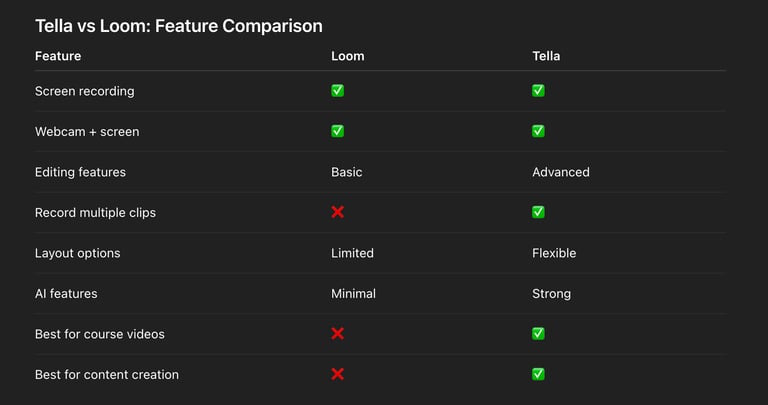
👉 If you're doing recording videos for content, tutorials, or courses, one is clearly better.
Why Many Creators Switched to Tella
Here’s the pattern I’ve seen (and experienced):
“I started with Loom… but I needed more control.”
So people:
wanted better editing capabilities
wanted to edit your videos without switching tools
needed better layouts for screen and camera
wanted videos that look more polished (without hiring an editor)
That’s when they switched to Tella.
Tella Review: Why It’s Better for Recording (Especially in 2025 and Beyond)
If you’re creating:
tutorial videos
course content
product demos
marketing videos
Then Tella is perfect.
Why?
Because Tella allows you to:
record multiple clips and stitch them together
re-record only parts of your video
customize layouts (facecam, full screen, split view)
create better storytelling flow
edit your videos inside the tool
👉 No more bouncing between tools like Screen Studio or separate video editors.
Loom and Tella for Startups (Sales, Marketing & Lead Generation)
Now let’s zoom out a bit.
This isn’t just about tools…
This is about sales and marketing for startups.
Why Video Matters for Startups
If you’re a:
SaaS startup
B2B founder
content marketer
sales team
Video helps you:
generate leads
improve conversion rates
explain your product or service faster
connect with your target audience
👉 In short: video accelerates your sales funnel
Using Tella for Lead Generation (Game Changer)
Here’s where Tella shines for lead generation for startups:
Use Tella for:
personalized outreach videos
product demos for prospects
landing page explainer videos
onboarding tutorials
webinar recordings
Imagine this flow:
Record a personalized video
Share it with a prospect
Build trust instantly
Close more deals
That’s powerful for startup sales and marketing efforts.
Loom vs Tella: Which One Should You Choose?
Choose Loom if:
you want fast, simple recording
you only need basic editing
your focus is internal communication
Choose Tella if:
you’re a content creator
you create tutorials or online courses
you want polished, professional videos
you care about storytelling and engagement
you want an alternative to Loom that does more
Final Verdict: Loom vs Tella
If we’re being honest:
Loom is great for quick communication
Tella is better for content creation and growth
👉 And in today’s world, content = attention = revenue
So if your goal is to:
grow your brand
generate leads
create better videos
improve your marketing strategy
Then yes…
Tella is the best Loom alternative right now.

🧰 Creator Tools Worth Knowing (and Using)


These are the tools I genuinely use to run and grow my business. Whether you're building content, managing projects, or streamlining how people connect with you, this stack has been essential. A few include partner links with exclusive discounts.
1. Tella
Create polished screen recordings and video presentations quickly. Great for demos, tutorials, and sharing ideas with clarity.
2. CapCut
A free, intuitive video editor that’s surprisingly powerful. Ideal for both short-form content and more in-depth edits.
3. Dub
Perfect for startups looking to grow through affiliate programs. Set up, manage, and scale your affiliate strategy—get 20% off with my link.
4. Cal.com
Easy, free and customizable scheduling that integrates with your workflow. A professional way to make meetings seamless.
5. Notion
Your all-in-one workspace for notes, project management, documentation, and collaboration.

Some links are affiliate partnerships, which means I may earn a commission if you choose to sign up. I only recommend tools I’ve tested and actually find valuable in my own work.

5. Buffer
Convert video into powerful blog articles.

5. Video to Blog
Your all-in-one social media management tool.
I’m Novie, I become your marketing arm — content, video, positioning, and systems — so you can focus on building the product.